Settings
The Settings window is where you configure Quran Caption — from keyboard shortcuts and themes to API keys and backups.
Open Settings using the gear icon in the title bar. These preferences apply across projects.
API keys
The API Keys panel groups the credentials used by the app:
- AI key — the provider API key, text endpoint, model, and reasoning effort used by the AI translation assistants, AI splitting, and meaning-based export ranges. These tools may incur charges from your chosen provider; they are separate from audio segmentation.
- Stock media — the Pexels and Pixabay API keys used to search stock media in the Video editor.
- Hugging Face account — an optional account token that can increase the daily GPU quota for cloud AI Segmentation.
The private local aligner has a separate setup step requiring a Hugging Face token with access to its private models. See AI Segmentation for the differences between methods.
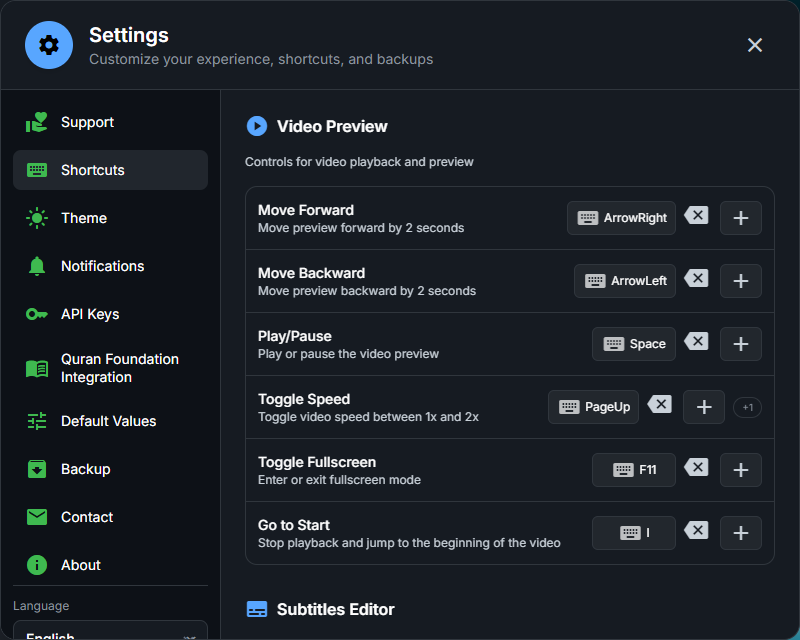
Shortcuts
Every keyboard shortcut can be customized. They are grouped into Video Preview, Subtitles Editor, Pre-defined Subtitles, and Timeline.
Theme
Choose between dark, light, and sepia themes, adjust their intensity, and optionally use a dimmed backdrop behind dialogs.
Notifications
Enable desktop notifications when a video export, AI segmentation, or AI trimming finishes.
Quran.com integration
Connect your Quran.com account to bookmark verses, save private reflections, and publish to QuranReflect.
Default values
Set the values used when a field is left empty — the default export file name format and the project categories available when creating a project. This panel also controls video thumbnails in the timeline.
Backup
Export your projects and batches into a JSON backup. This saves their data and media paths,
but does not copy audio, video, images, or application preferences. Keep the referenced files
too, or export individual projects as .qc packages to include their media.
Importing a backup adds missing projects and batches; existing IDs are skipped rather than overwritten, and existing items are not removed. Use Open projects folder to find the local project files.
Support, contact & about
The remaining panels let you support the project (PayPal, Ko-fi, or cryptocurrency wallets), contact the developer or join the Discord, and view the app version.